
Discover the top 5 laptops for AI and Machine Learning. We review high-performance machines perfect for deep learning, data science, and neural networks.
Artificial Intelligence (AI) and Machine Learning (ML) are no longer futuristic concepts—they are the tools shaping our daily lives right now. From developing complex neural networks to training large language models (LLMs) locally, the hardware demands for these tasks have skyrocketed. In 2025, professionals and enthusiasts alike are moving beyond cloud computing for every task. They need raw power at their fingertips, wherever they go.
The search for the perfect AI workstation is tricky. You aren’t just looking for a computer that can open a spreadsheet; you need a machine capable of parallel processing, handling massive datasets, and sustaining high performance without melting down. Whether you are a data scientist, an AI researcher, or a student diving into deep learning, your laptop is your primary weapon.
This guide breaks down the top five laptops for AI and machine learning in 2025. We analyzed GPU capabilities, memory bandwidth, thermal management, and portability to bring you the best options on the market. How Quantum Computing Could Impact Everyday Laptops.
Top 5 AI & Machine Learning Laptops of 2025: At a Glance
The following table provides a detailed specification comparison of the top-rated laptops for AI development, deep learning, and data science workloads in 2025.
| Laptop Model | GPU (Graphics) | CPU (Processor) | RAM (Memory) | Storage | Display | Key Pros | Key Cons |
|---|---|---|---|---|---|---|---|
| Lenovo Legion 9i Gen 10 | NVIDIA RTX 5090 (16GB GDDR7) | Intel Core Ultra 9 285H | 64GB DDR5 (6400MHz) | 2TB PCIe Gen 5 SSD | 16″ 3.2K Mini-LED | • Liquid cooling system • High VRAM for models • Excellent keyboard | • Heavy and bulky • Premium price tag |
| Apple MacBook Pro 16 | 40-core GPU (Integrated) | M4 Max (16-core) | Up to 128GB Unified Memory | 4TB SSD | 16.2″ Liquid Retina XDR | • Massive unified memory • Exceptional battery life • Silent operation | • No CUDA support • Non-upgradable |
| Razer Blade 18 (2025) | NVIDIA RTX 5080 (16GB GDDR7) | Intel Core i9-15900HX | 32GB DDR5 (Upgradable to 96GB) | 1TB NVMe SSD + Open Slot | 18″ QHD+ 240Hz | • Massive screen real estate • Thunderbolt 5 speeds • Sleek design | • Poor battery life • Expensive for specs |
| Dell Precision 7790 | NVIDIA RTX 5000 Ada (16GB GDDR6) | Intel Core Ultra 9 | 64GB CAMM2 (Upgradable to 128GB) | 4TB (RAID 0 Support) | 17.3″ UHD 120Hz | • ISV Certified reliability • High-density CAMM2 RAM • Extensive ports | • Thick, utilitarian design • Corporate pricing |
| ASUS ROG Zephyrus G14 | NVIDIA RTX 5070 (8GB GDDR7) | AMD Ryzen 9 9940HS | 32GB LPDDR5X (Soldered) | 1TB PCIe Gen 4 SSD | 14″ OLED 120Hz | • Highly portable • Vibrant OLED screen • Good battery life | • Low VRAM (8GB) limits training • Runs hot under load |
Top 5 Laptops for AI and Machine Learning
1. Lenovo Legion 9i Gen 10
Best Overall Performance
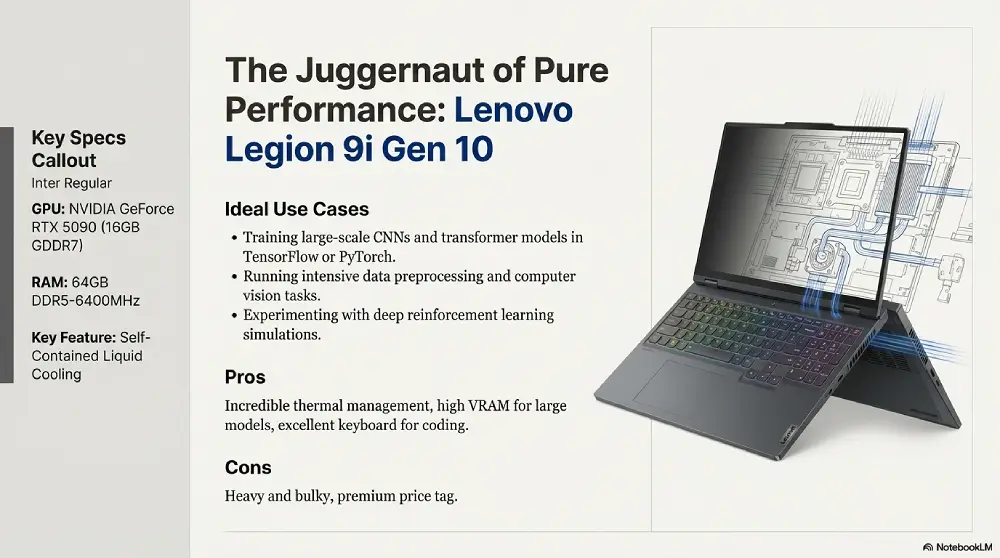
The Lenovo Legion series has long been a favorite among gamers, but the 9i Gen 10 is a monster for AI workloads. It features a dedicated AI chip that optimizes performance dynamically, making it a standout choice for training models.
- GPU: NVIDIA GeForce RTX 5090 (16GB GDDR7)
- CPU: Intel Core Ultra 9 285H
- RAM: 64GB DDR5-6400MHz
- Storage: 2TB PCIe Gen 5 SSD
- Display: 16″ 3.2K Mini-LED
Ideal Use Cases:
- Training large-scale convolutional neural networks (CNNs) and transformer models in TensorFlow or PyTorch.
- Running intensive data preprocessing, image recognition, or computer vision tasks.
- Experimenting with deep reinforcement learning simulations that require robust graphics capabilities.
Pros:
- Incredible thermal management with liquid cooling.
- High VRAM count crucial for loading larger models.
- Excellent keyboard for long coding sessions.
Cons:
- Heavy and bulky; not ideal for frequent travel.
- Premium price tag.
2. Apple MacBook Pro 16 (M4 Max)
Best for Mac-Based Workflows and On-the-Go Inference
Apple’s M4 Max chip shines with its unified memory architecture, making it possible to load large language models (LLMs) and handle huge datasets right on your laptop—something most traditional discrete GPUs can’t match. This is especially helpful for those who want to experiment with larger models, run inferences, or quickly prototype new ideas wherever they are.
- GPU: 40-core GPU (Integrated)
- CPU: 16-core CPU (M4 Max)
- RAM: Up to 128GB Unified Memory
- Storage: 4TB SSD
- Display: 16.2″ Liquid Retina XDR
Ideal Use Cases:
- Running, loading, and fine-tuning large language models (LLMs) directly on the laptop, thanks to unified memory.
- Rapid prototyping and deployment of AI models using frameworks like TensorFlow (Metal backend) or Swift for TensorFlow.
- Processing and analyzing massive datasets for NLP or time-series projects in a smooth, efficient workflow.
Important Note:
While the unified memory allows for loading and working with much bigger models than many Windows-based laptops, the training speed for heavy or sustained model training is much slower compared to laptops with NVIDIA GPUs and CUDA cores. Expert reviews and user experiences agree: fine-tuning and training can be started on the MacBook Pro, but for serious, large-scale model training, it is often “super slow” and may be impractical. Macs truly excel at on-the-go tasks like inference, RAG (Retrieval Augmented Generation), and prototyping—especially with their industry-leading battery life and fanless, quiet design—but are not the best choice for intensive, sustained model training workloads.
Pros:
- Unified memory enables loading of very large models for inference and lightweight fine-tuning.
- Unbeatable battery life for an on-the-go workstation.
- Silent operation under moderate loads.
Cons:
- Some specialized ML libraries still run better on NVIDIA CUDA cores.
- Non-upgradable RAM and storage.
3. Razer Blade 18 (2025 Edition)
Best Desktop Replacement
If you need desktop-class power in a form factor that technically fits in a backpack, the Razer Blade 18 is it. It maximizes wattage to the GPU, ensuring you get the full performance of the hardware without throttling.
- GPU: NVIDIA GeForce RTX 5080 (16GB GDDR7)
- CPU: Intel Core i9-15900HX
- RAM: 32GB DDR5 (Upgradable to 96GB)
- Storage: 1TB NVMe SSD + Open M.2 Slot
- Display: 18″ QHD+ 240Hz
Ideal Use Cases:
- Training medium to large neural networks, GANs, or performing real-time data augmentation.
- Running simulations in robotics, reinforcement learning, or 3D vision projects that benefit from a large, sharp display.
- Multitasking between data science workflows and resource-intensive visualization tools.
Pros:
- Large screen real estate is perfect for viewing code and datasets side-by-side.
- Thunderbolt 5 support for ultra-fast data transfer.
- Sleek, professional aesthetic.
Cons:
- Battery life is poor; you will need the power brick.
- Expensive for the specs compared to bulkier alternatives.
4. Dell Precision 7790
Best Workstation for Reliability
The Precision series is built for enterprise stability. It isn’t flashy, but it is certified to run professional software and can take a beating. For mission-critical AI deployment, this is the safest bet.
- GPU: NVIDIA RTX 5000 Ada Generation (16GB GDDR6)
- CPU: Intel Core Ultra 9
- RAM: 64GB CAMM2 Module (Upgradable to 128GB)
- Storage: 4TB RAID 0 Support
- Display: 17.3″ UHD 120Hz
Ideal Use Cases:
- Deploying and managing production-grade machine learning models in business or clinical settings.
- Running certified professional tools like MATLAB, AutoML platforms, and advanced data analytics software.
- Processing and analyzing high-volume data in regulated industries (e.g., healthcare, finance) requiring utmost reliability and compliance.
Pros:
- ISV certification ensures compatibility with top data science tools.
- CAMM2 memory modules offer higher density and speed.
- Extensive port selection.
Cons:
- Design is utilitarian and thick.
- Very expensive, often requiring a corporate budget.
5. ASUS ROG Zephyrus G14 (2025)
Best Portable Option
Not everyone wants to lug around a 10-pound workstation. The Zephyrus G14 packs incredible power into a 14-inch chassis. It’s perfect for students or researchers who need to run inference or lighter training tasks while traveling.
- GPU: NVIDIA GeForce RTX 5070 (8GB GDDR7)
- CPU: AMD Ryzen 9 9940HS
- RAM: 32GB LPDDR5X (Soldered)
- Storage: 1TB PCIe Gen 4 SSD
- Display: 14″ OLED 120Hz
Ideal Use Cases:
- On-the-go inference and lightweight model training, such as image classification or sentiment analysis.
- Presenting research projects or running live demos at conferences and classrooms.
- Engaging in hands-on learning with smaller datasets or cloud-based hybrid workflows.
Pros:
- Extremely lightweight and portable.
- Beautiful OLED screen.
- Great battery life for a Windows machine.
Cons:
- 8GB VRAM limits the size of models you can train effectively.
- Runs hot under sustained full load.
Buying Guide: How to Choose a Laptop for AI
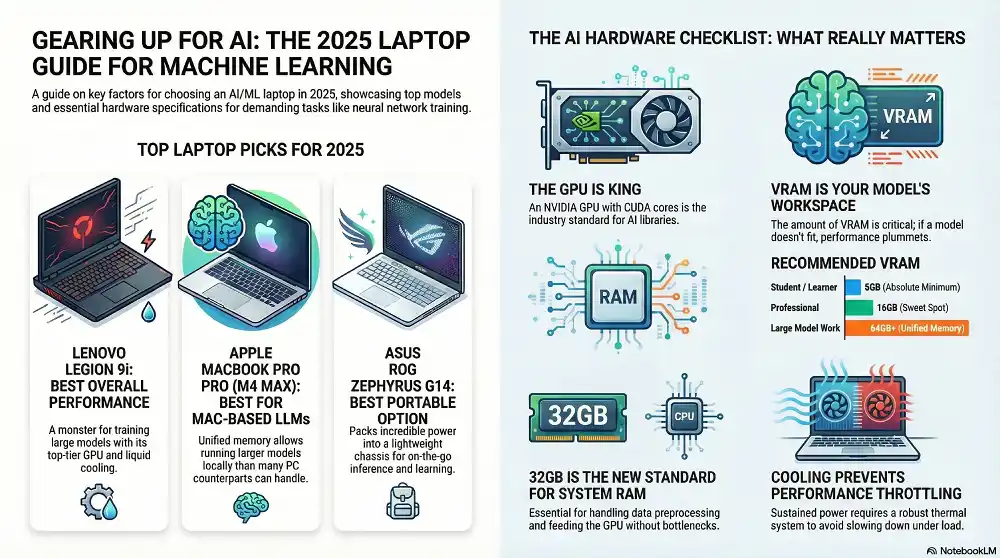
Selecting the right laptop for AI isn’t just about buying the most expensive one. You need to balance your specific needs with hardware capabilities, portability, and longevity. Here’s a more detailed look at what matters most.
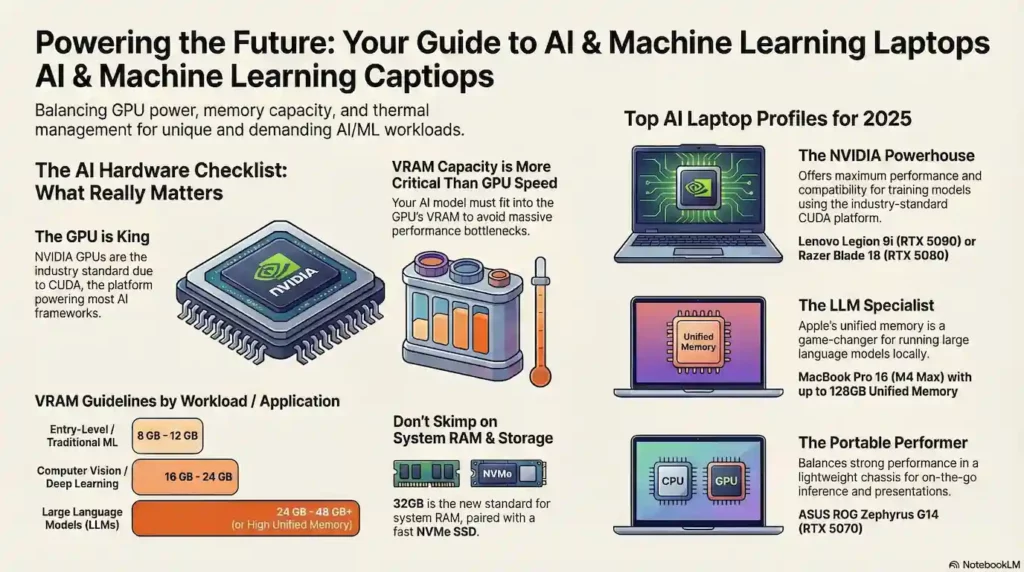
1. The GPU is King
For Deep Learning, the Graphics Processing Unit (GPU) is the most critical component. NVIDIA is currently the industry standard because of its CUDA cores and Tensor cores, which are optimized for AI libraries like TensorFlow and PyTorch.
- Recommendation: Aim for at least an RTX 4060 or 5060 for learning. For serious work, an RTX 5080/5090 or professional RTX Ada card is preferred.
2. VRAM (Video RAM)
This is where many buyers make mistakes. The speed of the GPU matters, but the amount of memory it has matters more for AI. If your model doesn’t fit into the VRAM, your system will swap data to the regular RAM, slowing down the process by orders of magnitude.
- Recommendation: 8GB is the absolute minimum for students. 16GB is a strong baseline for medium-sized professional models, but keep in mind that as model sizes continue to grow, more advanced projects—like large language models, complex NLP, and high-end research or enterprise applications—often require 24GB, 48GB, or even more VRAM. Professionals working with the largest LLMs or engaging in cutting-edge scientific computing should look for the highest VRAM or unified memory available (64GB+), and some enterprise-level tasks may even demand multi-GPU setups with 48GB to 80GB per GPU. Be sure to match your VRAM choice to the scale and ambition of your projects.
If you work with large LLMs, consider a MacBook Pro with high Unified Memory (64GB+).
If you work with large LLMs, consider a MacBook Pro with high Unified Memory (64GB+).
3. RAM (System Memory)
While the GPU handles the heavy lifting of training, your system RAM handles data preprocessing and feeding the GPU.
- Recommendation: 32GB is the new standard. Do not settle for 16GB in 2025. If you deal with massive datasets (like genomics or finance), go for 64GB.
4. Cooling and Thermal Throttling
A laptop spec sheet might say “RTX 5090,” but if the cooling system can’t handle the heat, that chip will slow down (throttle) to protect itself.
- Recommendation: Look for thicker laptops (like the Lenovo Legion or Dell Precision) rather than ultra-thin ones if your priority is sustained performance over hours of training.
5. Storage Speed
AI involves reading and writing massive amounts of data. A slow hard drive will bottleneck your expensive CPU and GPU.
- Recommendation: Ensure the laptop uses an NVMe SSD (PCIe Gen 4 or Gen 5). A minimum of 1TB is necessary, as datasets and models consume space quickly.
6. Battery Life Considerations
With all that high-performance hardware, battery life can take a hit. If you work from cafés, libraries, or while traveling, battery endurance becomes critical. Keep in mind that more powerful GPUs and CPUs will drain batteries faster, especially during intensive tasks.
- Tip: Seek out models that offer both high-capacity batteries and optimized power settings, or plan to work near power outlets during heavy AI workloads.
7. Portability vs. Performance Trade-Offs
Ultra-powerful laptops often mean more weight and bulk. If you’ll frequently be on the move, consider how much you’re willing to carry versus how much raw power you need. Lighter models are easier to carry but may throttle performance or have limited upgradability.
- Tip: Choose a balance based on your work style—if you mostly train or run large models at home, a heavier, more powerful laptop is ideal. For presenting demos, teaching, or research on the go, compact models like the Zephyrus G14 are more suitable.
8. Future-Proofing Your Investment
AI workloads are growing fast, so it helps to pick a laptop that won’t feel outdated within a year or two. Upgradability is your friend—being able to add RAM or swap out storage will extend your laptop’s life.
- Tip: Opt for models with upgradeable RAM and additional storage slots. Keep an eye on the latest GPU and CPU releases to ensure your purchase stays relevant for emerging AI frameworks and larger models.
Emerging Trends in AI Hardware
AI hardware is advancing at an incredible pace, opening up new possibilities for machine learning and pushing the limits of what laptops can do. Here are some key trends to watch:
Quantum Computing on the Horizon
Quantum computing is moving from research labs toward more practical, accessible systems. While we’re not quite at the point where quantum-powered laptops are standard, tech giants and startups are developing quantum chips that could one day dramatically accelerate machine learning processes like optimization and data search. In the near future, look for hybrid laptops or cloud platforms that let you tap into quantum hardware for high-level AI tasks.
AI-Specific Chips
Many manufacturers are now designing chips just for AI. Beyond the familiar CPUs and GPUs, you’ll see terms like NPUs (Neural Processing Units) and TPUs (Tensor Processing Units) showing up in laptops and mobile devices. These processors are optimized for tasks like image recognition, natural language processing, and deep learning, and can offer massive speed boosts compared to traditional hardware. Laptops with dedicated AI chips will likely become the go-to for real-time machine learning, high-speed inference, and even on-device training.
Next-Generation GPU Technology
GPUs remain the backbone of AI and ML work, but they’re evolving rapidly. Companies like NVIDIA and AMD are increasing memory bandwidth, improving parallel processing, and shrinking chips down while boosting efficiency. Expect to see even more powerful laptop GPUs in compact, energy-efficient designs, making them easier to take anywhere. Cloud integration and features like GPU virtualization will allow laptops to work seamlessly with remote resources—a big win for complex projects on the go.
Impact on Future Laptop Choices
These trends mean your next laptop could handle much more than today’s models—running larger models, processing data faster, and opening opportunities to experiment with the very latest in AI research. As quantum and AI-dedicated chips become more available, look for laptops that advertise support for these features. Staying updated with the latest in GPU releases will ensure your investment remains powerful and capable for years of innovation in machine learning.
Frequently Asked Questions (FAQs)
How does the evolving AI hardware landscape necessitate specific balancing of performance, portability, and cost?
As AI hardware advances, choosing the right laptop means carefully weighing your need for top performance, easy portability, and budget. Laptops with the newest powerful GPUs and large memory can handle bigger AI projects but are often heavier and more expensive. On the other hand, lighter and more portable models may save on weight and cost, but might limit performance with smaller GPUs or less RAM. The key is to match your laptop to your goals—if you travel or present often, balance a strong GPU with battery life and portability. For heavy modeling at a desk, prioritize raw performance, even if it means a bigger investment. Staying flexible with your needs and watching hardware trends helps ensure you get the best value without over- or under-spending.
Do I need a dedicated GPU for AI and machine learning?
Yes, most AI and deep learning tasks require a dedicated GPU for efficient training and inference. Integrated graphics are typically not powerful enough for modern AI workloads.
How much RAM is enough for deep learning?
A minimum of 32GB RAM is recommended for most deep learning workloads in 2025. More RAM is better if you’re working with large datasets or training complex models.
Can I use a MacBook for AI tasks?
You can use recent MacBook Pro models with high unified memory for many AI tasks. However, compatibility with certain AI and machine learning libraries (especially those optimized for NVIDIA CUDA) may be limited. For the widest compatibility and performance, NVIDIA-powered Windows laptops are still preferred by most AI professionals.
Is battery life important for AI laptops?
If you’re often mobile, battery life can be important. However, heavy AI workloads drain batteries quickly, so working near a power outlet is usually necessary during intensive computations.
Are upgradable RAM and storage important?
Absolutely! Being able to upgrade your RAM or storage helps your laptop stay useful as your needs or project sizes grow.
Final Thoughts
In 2025, the gap between desktop and laptop performance for AI tasks has narrowed significantly. Whether you choose the sheer power of the Lenovo Legion 9i or the efficient portability of the MacBook Pro, the right tool will accelerate your workflow and help you build the future of intelligence.

J.S. is the owner, content creator, and editor at Upgrades-and-Options.com. I’ve worked in the IT and Computer Support field for over 20 years. The server hardware in my computer labs has mostly been IBM, but I’ve supported Dell, HP, and various other hardware. In addition, as part of my lab administrator responsibilities, I’ve learned, supported, and repaired/upgraded network hardware such as Cisco routers and switches. READ FULL BIO >>