
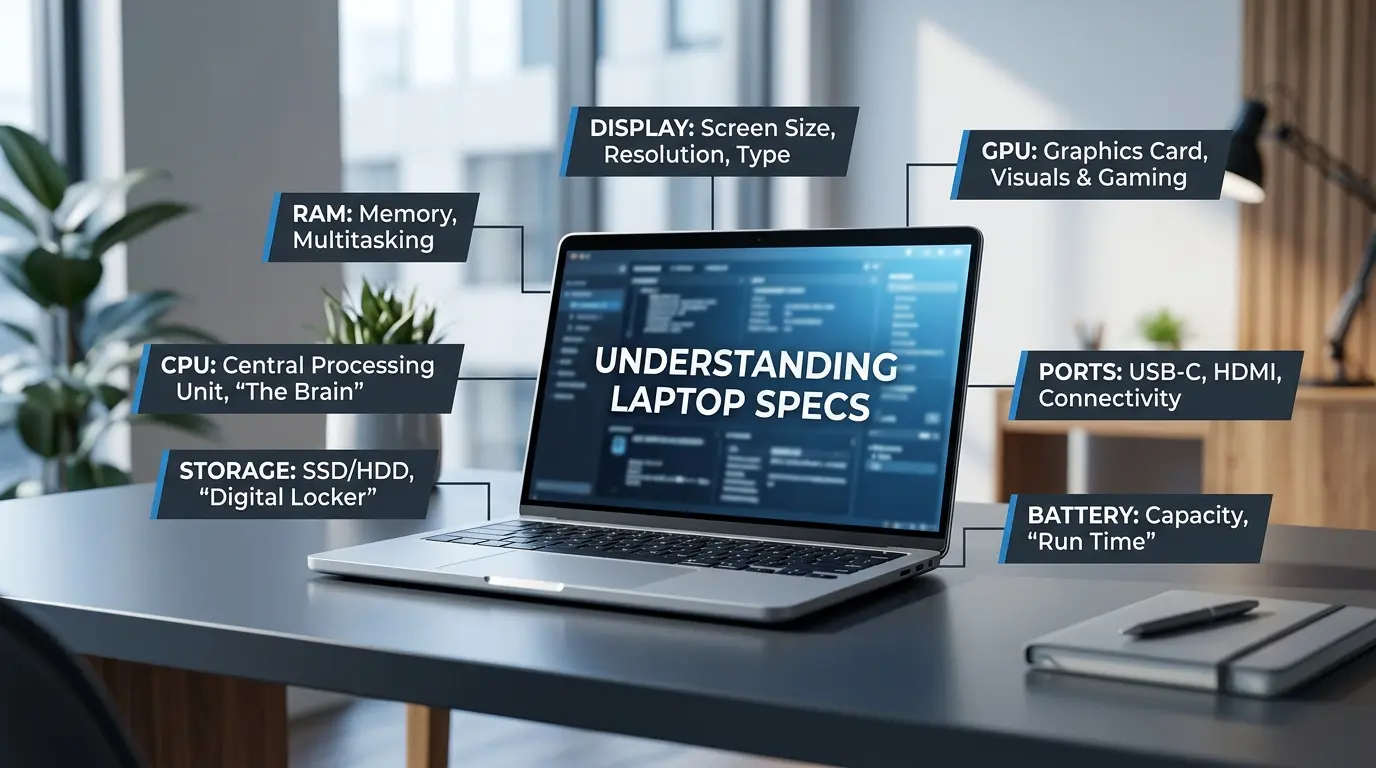
You’ve found a laptop you like. Then you scroll down to the specs and hit a wall of terms: “Ryzen 7,” “16GB DDR5,” “RTX 4060,” “100% sRGB.” It reads like a secret code, and you’re left wondering which one actually matters for you.
Take a breath. You don’t need a computer science degree to understand laptop specifications. You just need someone to translate them into plain English. That’s exactly what this guide does.
By the end, you’ll know how to read a CPU, RAM, storage, graphics (GPU), display specs, ports, and battery life. We’ll use one real machine, the Lenovo LOQ 16APH8, as our example throughout so you can see how the numbers play out in the real world. Let’s decode it together, one spec at a time.
- What Is a CPU, and Why Does It Matter?
- RAM Explained: What It Does and How Much You Need
- Storage Types: SSD vs. HDD and How Much Space You Need
- GPU and Graphics: Do You Need a Dedicated Graphics Card?
- Display Specs: Resolution, Refresh Rate, and Brightness
- Connectivity and Ports: What You Need for Everyday Use
- Battery Life: What Affects It and What to Expect
- Putting It All Together
- Frequently Asked Questions About Laptop Specifications
What Is a CPU, and Why Does It Matter?
The CPU (central processing unit), or processor, is the brain of your laptop. It handles nearly every task, from opening a web browser to editing a video. When people talk about a laptop feeling “fast” or “sluggish,” the CPU is often the reason.
Here are the terms you’ll see, explained simply:
- Cores: Think of these as workers. More workers can handle more jobs at once.
- Threads: Each worker can juggle two tasks at a time. Threads are those extra hands.
- Base frequency: The everyday working speed, measured in GHz.
- Max frequency: The turbo speed the CPU hits when a task demands more power.
- Cache: A small, super-fast memory that keeps frequently used data close by.
A Real Example: Ryzen 5 vs. Ryzen 7
The Lenovo LOQ 16APH8 comes with two AMD processor choices, and comparing them makes this crystal clear:
- AMD Ryzen 5 7535HS: 6 cores, 12 threads, 3.3GHz base, 4.5GHz max, 16MB cache
- AMD Ryzen 7 7735HS: 8 cores, 16 threads, 3.2GHz base, 4.75GHz max, 16MB L2 / 16MB L3 cache
Notice the Ryzen 7 has more cores and threads. That means it handles heavy multitasking, gaming, and video editing more smoothly. If you keep 20 browser tabs open while streaming music and editing photos, those extra workers earn their keep.
Takeaway: More cores and higher frequency generally mean better performance for demanding work. For light browsing and email, a Ryzen 5 (or similar) is plenty. For gaming or creative tasks, lean toward the Ryzen 7.
RAM Explained: What It Does and How Much You Need
RAM (random access memory) is your laptop’s short-term memory. It holds the apps and files you’re actively using so the CPU can reach them instantly. Think of it as a desk: the bigger the desk, the more projects you can spread out and work on at once.
Run out of RAM, and your laptop starts shuffling papers back into the drawer (your storage), which slows everything down. That’s why you’ll notice lag when too many apps are open on a low-RAM machine.
You’ll also see a spec like DDR5-5600. Here’s what that means:
- DDR5 is the generation of memory. Newer than DDR4, it’s faster and more efficient.
- 5600 is the speed. Higher numbers mean data moves quicker between RAM and CPU.
The Lenovo LOQ 16APH8 ships with 16GB of DDR5-5600 memory across two SO-DIMM slots. Those two slots enable dual-channel mode, which is like opening two lanes on a highway instead of one. Data flows faster, and that’s a real boost for gaming and multitasking.
How Much RAM Do You Actually Need?
Here’s a simple reference to save you money and headaches:
- 8GB: Fine for basic tasks like browsing, email, and word processing.
- 16GB: The sweet spot for multitasking, gaming, and everyday productivity. This is what the LOQ offers.
- 32GB or more: Best for heavy creative work like video editing, 3D rendering, or running virtual machines.
Takeaway: For most people, 16GB is the smart choice. Don’t overpay for 32GB unless your work truly demands it.
Storage Types: SSD vs. HDD and How Much Space You Need
Storage is where your files, apps, and operating system live long-term, even when the laptop is off. There are two main types, and the difference is night and day.
- HDD (hard disk drive): The old-school option. It uses spinning platters, which makes it slower and more fragile. Cheaper per gigabyte, but noticeably sluggish.
- SSD (solid-state drive): The modern standard. No moving parts, so it’s faster, quieter, and more durable. SSDs make your laptop boot in seconds and open apps almost instantly.
Today, an SSD is essential. According to industry data, SSDs can be several times faster than traditional hard drives for everyday tasks, which is why nearly every modern laptop uses one.
Understanding M.2 and PCIe
You’ll often see M.2 SSD and PCIe 4.0 x4 in the specs. Simply put:
- M.2 is the small, stick-shaped form factor of the drive.
- PCIe 4.0 x4 is the fast connection it uses. More lanes and newer versions mean quicker read and write speeds, so files transfer and games load faster.
The Lenovo LOQ 16APH8 supports up to two drives and includes an M.2 2280 PCIe 4.0 x4 slot, so you can add more fast storage down the road. That expandability is a genuine advantage. You don’t have to guess perfectly at purchase time.
How Much Storage Do You Need?
- Casual use (browsing, streaming, documents): 256GB–512GB works fine.
- Gaming: 1TB is wise, since modern games can eat 100GB each.
- Content creation: 1TB or more, especially for video files.
Not sure where you land? Our detailed guide, Laptop Storage: How Much You Really Need, walks you through matching capacity to your real habits, so you don’t overpay for space you’ll never touch or run out too soon.
Takeaway: Always choose an SSD, and pick capacity based on how you actually use your laptop.
GPU and Graphics: Do You Need a Dedicated Graphics Card?
The GPU (graphics processing unit) handles everything you see on screen, from smooth video playback to detailed game worlds. There are two kinds, and knowing the difference saves you real money.
- Integrated graphics: Built into the CPU and shares system RAM. Perfect for browsing, streaming, office work, and light photo editing.
- Discrete (dedicated) graphics: A separate, more powerful chip with its own memory (called VRAM). Built for gaming, video editing, and 3D work.
The LOQ’s Graphics Options
The Lenovo LOQ 16APH8 shows this contrast beautifully:
- AMD Radeon 610M (integrated): Great for everyday tasks and casual use.
- NVIDIA GeForce RTX 3050 / 4050 (discrete): 6GB GDDR6 VRAM, solid for mainstream gaming.
- NVIDIA GeForce RTX 4060 (discrete): 8GB GDDR6 VRAM, a real step up for demanding games and creative apps.
A couple of features you’ll spot here, explained simply:
- VRAM: The GPU’s own memory. More VRAM helps with high-resolution textures and smoother gameplay.
- DLSS 3: Smart NVIDIA tech that uses AI to boost frame rates, making games look smoother without straining the hardware.
- Resizable BAR: A feature that lets the CPU access more GPU memory at once for better performance.
Takeaway: Casual users can happily stick with integrated graphics and save money. Gamers and video editors should prioritize a discrete GPU. The more VRAM, the better for heavy visual work.
Display Specs: Resolution, Refresh Rate, and Brightness
The screen is what you stare at all day, so its specs matter more than people realize. Three numbers do most of the talking.
- Resolution: How many pixels the screen has. More pixels mean sharper, more detailed images.
- Refresh rate: How many times per second the screen updates, measured in Hz. Higher rates mean smoother motion, which gamers love.
- Brightness: Measured in nits. Higher numbers help you see clearly in bright rooms or near windows.
The LOQ’s Display Choices
The Lenovo LOQ 16APH8 offers two display options, and comparing them shows how specs shape your experience:
- 15″ WUXGA (1920×1200): Sharp Full HD-plus resolution, IPS panel, 350 nits, 100% sRGB.
- 16″ WQXGA (2560×1600): A crisper, higher-resolution panel with a 165Hz refresh rate, 350 nits, and 100% sRGB.
That 100% sRGB figure refers to color gamut, or the range of colors the screen can display. Full sRGB coverage means colors look accurate and vivid, which matters for photos, video, and games.
The 165Hz refresh rate on the 16-inch model is a gamer’s dream, delivering buttery-smooth motion. Meanwhile, the higher WQXGA resolution benefits anyone doing detailed creative work.
Takeaway: Gamers should prioritize a high refresh rate. Creative pros should value resolution and color accuracy. A brightness of 350 nits handles most indoor lighting with ease.
Connectivity and Ports: What You Need for Everyday Use
Ports decide what you can plug in, and a good selection saves you from carrying a bag of adapters. Here are the common ones:
- USB-C: The versatile modern standard. Handles data, video output, and charging on many devices.
- USB-A: The classic rectangular port for mice, keyboards, and flash drives.
- HDMI: Connects to external monitors and TVs.
- Ethernet (RJ-45): For a fast, stable wired internet connection.
The LOQ’s Port Lineup
The Lenovo LOQ 16APH8 comes well-equipped:
- 1x USB 2.0
- 2x USB 3.2 Gen 2 (10 Gbit/s data transfer)
- 1x USB-C 3.2 Gen 2 with Power Delivery and DisplayPort 1.4
- 1x HDMI 2.1 (supports up to 8K/60Hz)
- 1x Ethernet (RJ-45) with Gigabit speeds
- 1x headphone/microphone combo jack
On the wireless side, it packs Wi-Fi 6 and Bluetooth 5.1. Wi-Fi 6 means faster, more stable wireless, even when lots of devices share your network. Bluetooth connects your wireless headphones, mice, and more without cables.
Notice the HDMI 2.1 and USB-C with DisplayPort? Those let you add external screens. The LOQ can drive up to three displays at once. If you want more workspace on the go, our guide Unlock The Benefits Of A Portable Laptop Monitor shows how the right ports let you snap on a second screen anywhere. It’s a practical payoff for understanding these specs.
Quick checklist for ports:
- Plan to use an external monitor? Look for HDMI or USB-C with DisplayPort.
- Want wired internet for gaming or big downloads? Check for Ethernet.
- Charge your phone or laptop over one cable? Prioritize USB-C with Power Delivery.
Takeaway: Match the ports to your gear. A laptop with a broad selection, like the LOQ, keeps you flexible.
Battery Life: What Affects It and What to Expect
Battery capacity is measured in watt-hours (Wh). As a general rule, more Wh means longer time away from an outlet, though real-world results depend heavily on how you use the machine.
The LOQ’s Two Battery Options
The Lenovo LOQ 16APH8 offers two batteries, and their benchmarks tell an interesting story:
- 60Wh battery: Up to 9.3 hours on the MobileMark 2018 test, 7.8 hours of local 1080p video playback.
- 80Wh battery: Up to 6.5 hours on MobileMark 2018, but 9.3 hours of video playback.
Here’s the key lesson: advertised battery life is a best-case estimate. Manufacturers measure it under gentle conditions. In daily use, several factors drain the battery faster:
- High screen brightness
- Background apps and downloads
- Wireless activity (Wi-Fi and Bluetooth)
- Demanding tasks like gaming
That’s why the same laptop can last all afternoon on light work but only a couple of hours while gaming.
One handy bonus on the LOQ is Rapid Charge, which tops the 60Wh battery to 80% in about an hour. The 80Wh model supports Rapid Charge Pro, hitting 50% in just 30 minutes. For people always on the move, fast charging is often more valuable than raw battery size.
Takeaway: Treat battery ratings as a ceiling, not a promise. If you travel often, prioritize both capacity and fast charging.
Putting It All Together
You started this guide facing a wall of confusing terms. Now you can read a spec sheet like a pro. Here’s the quick recap:
- CPU: The brain. More cores and higher frequency mean faster performance.
- RAM: Short-term memory. 16GB is the sweet spot for most people.
- Storage: Always pick an SSD; choose capacity based on your habits.
- GPU: Integrated for everyday use, discrete for gaming and creative work.
- Display: High refresh rate for gamers, high resolution for creators.
- Ports: Match them to the devices you actually use.
- Battery: Ratings are a best case; fast charging is a real bonus.
The real power here is confidence. Instead of guessing, you can now match a laptop’s specifications to your actual needs and avoid overpaying for features you’ll never use.
Ready to put your new knowledge to work? Take a look at our roundup of the Top 5 Most Wished For Laptops on Amazon. Now that you can read specs with confidence, you’ll see exactly how these popular models stack up and find the one that fits your needs and your budget.
Frequently Asked Questions About Laptop Specifications
What is a good processor for a laptop? For most people, a good laptop processor is one that matches how they actually use their machine. If you browse the web, stream video, and handle everyday tasks, an Intel Core i5 or AMD Ryzen 5 is more than enough — both offer solid speed without driving up the price. If you game, edit photos, or multitask heavily, step up to a Core i7 or Ryzen 7 for more cores, more threads, and faster performance under pressure. Power users who work with video editing, 3D rendering, or heavy creative software should look at a Core i9 or Ryzen 9. Two things to watch: the number of cores (more cores handle more tasks at once) and the clock speed in GHz (higher means faster individual task performance). The Lenovo LOQ 16APH8, for example, offers a choice between the AMD Ryzen 5 7535HS and the Ryzen 7 7735HS — a great illustration of how stepping up within the same processor family gives you noticeably more muscle for demanding work.
Do I need a dedicated graphics card in a laptop? It depends on what you plan to do with it. If you mostly browse the web, stream video, write documents, or join video calls, you don’t need one. Integrated graphics, the kind built into the CPU, handle all of that without a problem. But if you want to play modern games, edit video, work with 3D software, or run creative apps like Adobe Premiere, a dedicated GPU makes a real difference. It has its own memory (VRAM) and processing power, so it takes the heavy visual work off the CPU’s hands. The Lenovo LOQ 16APH8, for example, offers discrete NVIDIA GeForce RTX options starting with the RTX 3050 and going up to the RTX 4060 — each a solid step up for gaming and creative tasks. As a rule of thumb: casual users can skip it and save money, while gamers and content creators should treat it as a priority.
Is SSD better than HDD in a laptop? Yes, and by a wide margin for most users. An SSD (solid-state drive) has no moving parts, so it reads and writes data much faster than a traditional HDD (hard disk drive), which relies on spinning platters. In practice, that means your laptop boots in seconds instead of minutes, apps open almost instantly, and large files transfer quickly. SSDs are also more durable since there’s nothing to break if you drop the bag, and they run quieter and cooler. The only real advantage an HDD has is cost — you get more storage space for less money. But for the speed and reliability gains, an SSD is almost always worth it. Most modern laptops, including the Lenovo LOQ 16APH8 with its PCIe 4.0 M.2 SSD, have already made the switch, and once you experience SSD speed, it’s hard to go back.
For most people, 16GB of RAM is the sweet spot. It handles everyday multitasking — multiple browser tabs, streaming, video calls, and productivity apps — without breaking a sweat. If you only browse the web, write documents, and check email, you can get by with 8GB and save some money. But if you game, edit photos, or work with large files, 16GB keeps things running smoothly. Step up to 32GB only if you do serious video editing, 3D rendering, or run virtual machines regularly. The good news? Some laptops, like the Lenovo LOQ 16APH8, have two memory slots, which means you can start with 16GB and upgrade later if your needs grow.
Before diving into the questions, here’s a quick answer to the one beginners ask most: the specs that matter most depend on how you use your laptop, but CPU, RAM, and storage are the foundation for every user, while GPU and display specs matter more if you game or create content.

J.S. is the owner, content creator, and editor at Upgrades-and-Options.com. I’ve worked in the IT and Computer Support field for over 20 years. The server hardware in my computer labs has mostly been IBM, but I’ve supported Dell, HP, and various other hardware. In addition, as part of my lab administrator responsibilities, I’ve learned, supported, and repaired/upgraded network hardware such as Cisco routers and switches. READ FULL BIO >>
- Laptop Specs Explained: A Beginner’s Guide to CPU, RAM & More
 You’ve found a laptop you like. Then you scroll down to the specs and hit a wall of terms: “Ryzen 7,” “16GB DDR5,” “RTX 4060,” “100% sRGB.” It reads like a secret code, and you’re left wondering which one actually matters for you. Take a breath.… Read more: Laptop Specs Explained: A Beginner’s Guide to CPU, RAM & More
 - Best Laptops for AI and Machine Learning
 Discover the top 5 laptops for AI and Machine Learning. We review high-performance machines perfect for deep learning, data science, and neural networks. Artificial Intelligence (AI) and Machine Learning (ML) are no longer futuristic concepts—they are the tools shaping our daily lives right now. From developing… Read more: Best Laptops for AI and Machine Learning
 - Upgrading SSD Storage in the ThinkPad X9-15 Gen 1 Aura Edition
 Upgrading SSD Storage and Analyzing Memory in the ThinkPad X9-15 Gen 1 Aura Edition Upgrade Your ThinkPad X9-15 SSD Like a Pro: A Technical Guide The ThinkPad X9-15 Gen 1 Aura Edition (Machine Types 21Q6 and 21Q7) is designed as a premium device. While memory is… Read more: Upgrading SSD Storage in the ThinkPad X9-15 Gen 1 Aura Edition
 - How Quantum Computing Could Impact Everyday Laptops
 Quantum computing may sound like science fiction, but its potential to revolutionize technology is very real. Unlike classical computing, which processes information using bits as 0s and 1s, quantum computing leverages the strange and exciting principles of quantum mechanics — like superposition and entanglement — to… Read more: How Quantum Computing Could Impact Everyday Laptops
 - What Is The Difference Between Lenovo’s Pens? (with Part Numbers)
 Do you ever find yourself writing with an old-school pen or even worse a pencil? As you pry your fingers off that last-century writing device, ask yourself if there isn’t a better way. Well ask no more, there is a whole world of digital pens out… Read more: What Is The Difference Between Lenovo’s Pens? (with Part Numbers)